




前提
- 能够通过
Flask从数据库中操作数据
python打造个人管理系统05-Flask中MySql的配置
模板引擎
本文介绍 Flask 中的 Jinja2 模板引擎,以及常用到的模板语言
模板变量参数
进入 templates 目录,创建一个 index.html 模板文件:
<html>
	<head>
		<title>{{name}}的健身记录</title>
	</head>

	<body>
		运动名称:{{sport_name}}, 消耗卡路里: {{cal}}
	</body>
</html>
在上面,我们定义了三个变量: name, sport_name, cal 。他们在路由中将通过 render_template 方法将值传递过去。
@app.route('/')
def index():
    fitness = Fitness.query.get(2)
    return render_template('index.html', name='rikka',
                            sport_name=fitness.sport_name,
                           cal=fitness.calorie)
在这里,我们获取了数据库中 id 为 2 的数据,并将值传递到模板中。
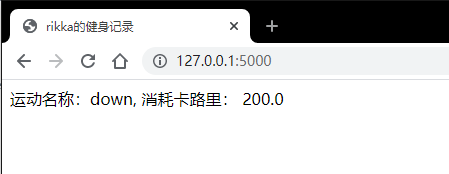
但如果变量很多怎么办?可以在方法中将模板变量的值先赋好,然后使用 **locals() 来代替它们,像这样:
@app.route('/')
def index():
    fitness = Fitness.query.get(2)
    name = 'rikka'
    sport_name = fitness.sport_name
    cal = fitness.calorie
    return render_template('index.html', **locals())
遍历模板数据
使用 {% for i in list %} ... {% endfor %} 来遍历所有数据。如:
<html>
  <head>
    <title>
      {{name}}的健身记录
    </title>
  </head>

  <body>
    <table border="1">
      <thead>
        <th>运动名称</th>
        <th>消耗卡路里</th>
      </thead>

      <tbody>
        {% for fit in fitness %}
          <tr>
            <td>{{fit.sport_name}}</td>
            <td>{{fit.calorie}}</td>
          </tr>
        {% endfor %}
      </tbody>
    </table>
  </body>
</html>
@app.route('/')
def index():
    fitness = Fitness.query.all()
    name = 'rikka'
    return render_template('for.html', **locals())
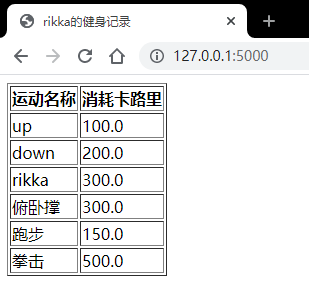
判断输出
如果只想展示卡路里大于 200 的数据,我们可以在模板语言中使用 {% if xxx %} ... {% endif %} 语句判断。如:
...
<table border="1">
  <thead>
    <th>运动名称</th>
    <th>消耗卡路里</th>
  </thead>

  <tbody>
    {% for fit in fitness %}
      {% if fit.calorie > 200 %}
        <tr>
          <td>{{fit.sport_name}}</td>
          <td>{{fit.calorie}}</td>
        </tr>
      {% endif %}
    {% endfor %}
  </tbody>
</table>
...
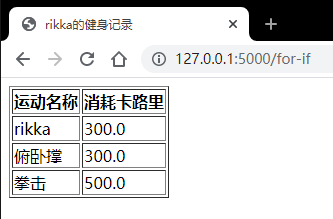
总结
本文介绍了 Jinja2 模板引擎最常用的方式。作为预先知识的一部分,不纳入项目。
- 模板变量
- 遍历数据
- if判断
原创
python打造个人管理系统06-模板引擎渲染数据
本文采用 CC BY-NC-SA 4.0 许可协议,转载请注明出处。
评论交流
欢迎留下你的想法